Showing posts with label IBMMQ. Show all posts

Wednesday, May 12, 2021

IBM MQ Uniform cluster setup

 Uniform Cluster is introduced in 9.1.X CD and in 9.2 LTS releases .It support Application connection balancing to form ACTIVE/ACTIVE Queue Manager setup.

A MQ Uniform cluster allows a set of Queue Managers to work together intelligently to work as a single unit to distribute the load evenly across.
This provides a horizontal scaled small collection of Queue Managers . These QMGR's are almost identically configured with same queues , Channels and Authentication records
The Uniform cluster make sure the traffic is evenly distributed across the available queue managers for better load balancing the connection .

Advantage of a uniform cluster, each application should also be scaled into multiple matching instances, preferably with at least as many instances as there are queue managers, if not many more.An IBM MQ cluster, of whatever size, provides multiple capabilities:

  • A directory of all clustering resources, discoverable by any member in a cluster
  • Automatic channel creation and connectivity
  • Horizontal scaling across multiple matching queues, using message workload balancing
  • Dynamic message routing, based on availability

Uniform clusters use IBM MQ clustering for communication between queue managers, and balancing of workload between queues. However they differ from typical IBM MQ clusters in the following ways:

  • Uniform clusters typically have a smaller number of queue managers in the cluster. You should not create a uniform cluster with greater than 10 queue managers.
  • Every member of the cluster has near-identical configuration.
  • The cluster is typically used by a single application, or group of related applications.
  • The number of application instances connecting to the cluster should be greater than, or equal to, the number of queue managers.
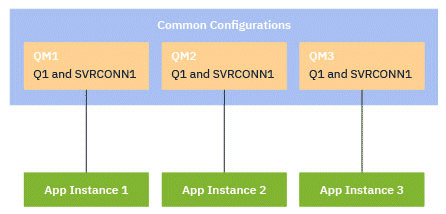
Diagram representing various common configurations for three queue managers; either a common queue or a common channel.
Unified Cluster Example

Let us try to create a Unifrom cluster with 3 Queue Managers .

Create a file UniCluster.ini that describes how you want the cluster itself to look in terms of full repositories.As for any cluster, two full repositories act as central stores of information about the cluster.Specifically, you need to describe the names and connection names for the two full repositories in this cluster. Here we use QMGR1 and QMGR2 as full repositories.

UniCluster.ini

AutoCluster:
Type=Uniform
Repository1Name=QMGR1
Repository1Conname=127.0.0.1(1414)
Repository2Name=QMGR2
Repository2Conname=127.0.0.1(1415)
ClusterName=UNICLUSTER

The RepositoryNConname fields are used as the conname attribute for other cluster members to define cluster senders (CLUSSDR) to them

Create a sample configuration file, UniCluster.mqsc which contains the MQSC definitions you want to be applied to all cluster members.There is one mandatory line needed in this file, which is a definition of a cluster receiver channel (CLUSRCVR), with a CLUSTER attribute of the automatic cluster name (usually through the +AUTOCL+ insert) and a channel name which includes the +QMNAME+ insert.This describes how other members of the uniform cluster connect to each queue manager and is used as a template of how to connect to the other queue managers as well.

  • +AUTOCL+The automatic cluster name
  • +QMNAME+The name of the queue manager being created+
  • +VARIABLE+Any <variable name> defined during queue manager creation or in the Variables qm.ini stanza, for example +CONNAME+

Make these two files available on each machine that will host a uniform cluster member. In our Scenario We are using single machine .

UniCluster.mqsc

  • Simplify the demo system by disabling channel and connection authentication
    ALTER QMGR CHLAUTH(DISABLED) CONNAUTH(' ')
    REFRESH SECURITY TYPE(CONNAUTH)
  • The only definition required to join a Uniform CLuster when using AutoCluster is to define a cluster receiver channel
  • This will use the cluster name from the AutoCluster ini file setting and the connection name from the crtmqm command
    DEFINE CHANNEL(UNICLUSTER.+QMNAME+) CHLTYPE(CLUSRCVR) CLUSTER(+AUTOCL+) CONNAME(+CONNAME+) SHORTRTY(120) SHORTTMR(5)
  • Every queue manager needs to accept client connections
    DEFINE CHANNEL(SVRCONN.CHANNEL) CHLTYPE(SVRCONN)
  • Messaging resources like queues need to be defined on every member of the uniform cluster
    DEFINE QLOCAL(Q1) CLUSTER(UNICLUSTER) DEFPSIST(YES) DEFBIND(NOTFIXED)

Note: Replace . with * in the above content . * will not be executed in runmqsc it is for comment .

On the command line, supply:

  • A request to start a listener, on the expected port
  • A request for automatic INI configuration (-ii) pointing to the automatic cluster setup file (uniclus.ini)
  • A request for automatic MQSC configuration (-ic) pointing to the MQSC configuration file which includes a CLUSRCVR definition for the uniform cluster.
  • A variable for the CONNAME for this queue manager

# Create QMGR1 and listen on port 1414
crtmqm -ii UniCluster.ini -ic UniCluster.mqsc -iv CONNAME="127.0.0.1(1414)" -p 1414 QMGR1

# Create QMGR2 and listen on port 1415
crtmqm -ii UniCluster.ini -ic UniCluster.mqsc -iv CONNAME="127.0.0.1(1415)" -p 1415 QMGR2

# Create QMGR3 and listen on port 1416
crtmqm -ii UniCluster.ini -ic UniCluster.mqsc -iv CONNAME="127.0.0.1(1416)" -p 1416 QMGR3


mqm@ip-172-31-14-154 ~]$ crtmqm -ii UniCluster.ini -ic UniCluster.mqsc -iv CONNAME="127.0.0.1(1414)" -p 1414 QMGR1
IBM MQ queue manager created.
Directory '/var/mqm/qmgrs/QMGR1' created.
The queue manager is associated with installation 'Installation1'.
Creating or replacing default objects for queue manager 'QMGR1'.
Default objects statistics : 84 created. 0 replaced. 0 failed.
Completing setup.
Setup completed.
[mqm@ip-172-31-14-154 ~]$ crtmqm -ii UniCluster.ini -ic UniCluster.mqsc -iv CONNAME="127.0.0.1(1415)" -p 1415 QMGR2
IBM MQ queue manager created.
Directory '/var/mqm/qmgrs/QMGR2' created.
The queue manager is associated with installation 'Installation1'.
Creating or replacing default objects for queue manager 'QMGR2'.
Default objects statistics : 84 created. 0 replaced. 0 failed.
Completing setup.
Setup completed.
[mqm@ip-172-31-14-154 ~]$ crtmqm -ii UniCluster.ini -ic UniCluster.mqsc -iv CONNAME="127.0.0.1(1416)" -p 1416 QMGR3
IBM MQ queue manager created.
Directory '/var/mqm/qmgrs/QMGR3' created.
The queue manager is associated with installation 'Installation1'.
Creating or replacing default objects for queue manager 'QMGR3'.
Default objects statistics : 84 created. 0 replaced. 0 failed.
Completing setup.
Setup completed.
[mqm@ip-172-31-14-154 ~]$

Each queue manager in the uniform cluster is created with an almost identical command line - all the differences between full and partial repository are handled automatically for a uniform cluster.

Start the QMGR;s using below

strmqm QMGR1
strmqm QMGR2
strmqm QMGR3
mqm@ip-172-31-14-154 ~]$ strmqm QMGR1 ; strmqm QMGR2 ;strmqm QMGR3
The system resource RLIMIT_NOFILE is set at an unusually low level for IBM MQ.
The system resource RLIMIT_NPROC is set at an unusually low level for IBM MQ.
Successfully applied automatic configuration INI definitions.
IBM MQ queue manager 'QMGR1' starting.
The queue manager is associated with installation 'Installation1'.
5 log records accessed on queue manager 'QMGR1' during the log replay phase.
Log replay for queue manager 'QMGR1' complete.
Transaction manager state recovered for queue manager 'QMGR1'.
IBM MQ queue manager 'QMGR1' started using V9.2.0.1.
The system resource RLIMIT_NOFILE is set at an unusually low level for IBM MQ.
The system resource RLIMIT_NPROC is set at an unusually low level for IBM MQ.
Successfully applied automatic configuration INI definitions.
IBM MQ queue manager 'QMGR2' starting.
The queue manager is associated with installation 'Installation1'.
5 log records accessed on queue manager 'QMGR2' during the log replay phase.
Log replay for queue manager 'QMGR2' complete.
Transaction manager state recovered for queue manager 'QMGR2'.
IBM MQ queue manager 'QMGR2' started using V9.2.0.1.
The system resource RLIMIT_NOFILE is set at an unusually low level for IBM MQ.
The system resource RLIMIT_NPROC is set at an unusually low level for IBM MQ.
Successfully applied automatic configuration INI definitions.
IBM MQ queue manager 'QMGR3' starting.
The queue manager is associated with installation 'Installation1'.
5 log records accessed on queue manager 'QMGR3' during the log replay phase.
Log replay for queue manager 'QMGR3' complete.
Transaction manager state recovered for queue manager 'QMGR3'.
IBM MQ queue manager 'QMGR3' started using V9.2.0.1.
[mqm@ip-172-31-14-154 ~]$ 
++++++++++++++++

[mqm@ip-172-31-14-154 ~]$ dspmq
QMNAME(QMGR1)                                             STATUS(Running)
QMNAME(QMGR2)                                             STATUS(Running)
QMNAME(QMGR3)                                             STATUS(Running)
[mqm@ip-172-31-14-154 ~]$ ps -ef |grep lsr
mqm        18731   18686  0 Apr04 ?        00:00:04 /opt/mqm/bin/runmqlsr -r -m QMGR1 -t TCP -p 1414
mqm        18895   18839  0 Apr04 ?        00:00:03 /opt/mqm/bin/runmqlsr -r -m QMGR2 -t TCP -p 1415
mqm        19070   19012  0 Apr04 ?        00:00:03 /opt/mqm/bin/runmqlsr -r -m QMGR3 -t TCP -p 1416
mqm        21594   21557  0 12:39 pts/0    00:00:00 grep --color=auto lsr
[mqm@ip-172-31-14-154 ~]$ 

QMGR's are created with Auto config file and Unifom.mqsc definitions . Let us see the cluster information

Verify the uniform cluster setup

AMQ8441I: Display Cluster Queue Manager details.
   CLUSQMGR(QMGR1)                         CHANNEL(UNICLUSTER.QMGR1)
   CLUSTER(UNICLUSTER)                     QMID(QMGR1_2021-04-04_04.37.47)
   QMTYPE(REPOS)                           STATUS(RUNNING)
AMQ8441I: Display Cluster Queue Manager details.
   CLUSQMGR(QMGR2)                         CHANNEL(UNICLUSTER.QMGR2)
   CLUSTER(UNICLUSTER)                     QMID(QMGR2_2021-04-04_04.37.58)
   QMTYPE(REPOS)                           STATUS(RUNNING)
AMQ8441I: Display Cluster Queue Manager details.
   CLUSQMGR(QMGR3)                         CHANNEL(UNICLUSTER.QMGR3)
   CLUSTER(UNICLUSTER)                     QMID(QMGR3_2021-04-04_04.38.07)
   QMTYPE(NORMAL)                          STATUS(RUNNING)

The amqsghacamqsphac, and amqsmhac programs are started from the command line, and can be used in combination to demonstrate reconnection after the failure of one instance of a multi-instance queue manager. We will use amqsphac in our example

MQ_INSTALLATION_PATH=/opt/mqm
export MQCHLLIB=/home/mqm
export MQCHLTAB=CCDT.JSON

# Check that the CCDT.JSON file exists before starting the applications
if [ -f "$MQCHLLIB/$MQCHLTAB" ]; then

  # Start multiple instances of the sample application
  for (( i=0; i<10; ++i)); do
    $MQ_INSTALLATION_PATH/samp/bin/amqsghac Q1 *ANY_QM &
  done

else
  echo "$MQCHLLIB/$MQCHLTAB not found"
fi

RunClient.sh file with the below CCDT file . We used 10 you can change to any values to create n number of connections

CCDT File with the below content .

{
    "channel": 
    [
        {
            "name": "SVRCONN.CHANNEL",
            "clientConnection": 
            {
                "connection": 
                [
                    {
                        "host": "localhost",
                        "port": 1414
                    }
                ],
                "queueManager": "ANY_QM"
            },
            "connectionManagement":
            {
              "clientWeight": 1,
              "affinity": "none"
            },
            "type": "clientConnection"
        },
        {
            "name": "SVRCONN.CHANNEL",
            "clientConnection": 
            {
                "connection": 
                [
                    {
                        "host": "localhost",
                        "port": 1415
                    }
                ],
                "queueManager": "ANY_QM"
            },
            "connectionManagement":
            {
              "clientWeight": 1,
              "affinity": "none"
            },
            "type": "clientConnection"
        },
        {
            "name": "SVRCONN.CHANNEL",
            "clientConnection": 
            {
                "connection": 
                [
                    {
                        "host": "localhost",
                        "port": 1415
                    }
                ],
                "queueManager": "ANY_QM"
            },
            "connectionManagement":
            {
              "clientWeight": 1,
              "affinity": "none"
            },
            "type": "clientConnection"
        },
        {
            "name": "SVRCONN.CHANNEL",
            "clientConnection": 
            {
                "connection": 
                [
                    {
                        "host": "localhost",
                        "port": 1414
                    }
                ],
                "queueManager": "QMGR1"
            },
            "type": "clientConnection"
        },
        {
            "name": "SVRCONN.CHANNEL",
            "clientConnection": 
            {
                "connection": 
                [
                    {
                        "host": "localhost",
                        "port": 1415
                    }
                ],
                "queueManager": "QMGR2"
            },
            "type": "clientConnection"
        },
        {
            "name": "SVRCONN.CHANNEL",
            "clientConnection": 
            {
                "connection": 
                [
                    {
                        "host": "localhost",
                        "port": 1416
                    }
                ],
                "queueManager": "QMGR3"
            },
            "type": "clientConnection"
        }
   ]
}
There is no default JSON CCDT, and IBM MQ does not supply any tooling to create or edit CCDTs in JSON format.
You do not need to be using IBM MQ for Multiplatforms to create and edit a JSON CCDT file.
Using the JSON format, you can define duplicate channel definitions of the same name. When you deploy IBM MQ on the cloud, you can use this to make your deployment scalable and highly available.
The JSON file is human readable, which can simplify queue manager configuration.
You need no specialist tooling to maintain the CCDT file.
The file is smaller.
This format provides backwards and forwards compatibility.
Locally by setting the MQCHLLIB and MQCHLTAB environment variables.
Run the command runmqsc -n
Run the DISPLAY CHANNEL command. For example, run DISPLAY CHANNEL(*). as shown in the below
mqm@ip-172-31-14-154 ~]$ export MQCHLLIB=/var/mqm
[mqm@ip-172-31-14-154 ~]$ export MQCHLTAB=CCDT.JSON
[mqm@ip-172-31-14-154 ~]$ runmqsc -n
5724-H72 (C) Copyright IBM Corp. 1994, 2020.
Starting local MQSC for 'CCDT.JSON'.


dis chl(*)
     1 : dis chl(*)
AMQ8414I: Display Channel details.
   CHANNEL(SVRCONN.CHANNEL)                CHLTYPE(CLNTCONN)
AMQ8414I: Display Channel details.
   CHANNEL(SVRCONN.CHANNEL)                CHLTYPE(CLNTCONN)
AMQ8414I: Display Channel details.
   CHANNEL(SVRCONN.CHANNEL)                CHLTYPE(CLNTCONN)
AMQ8414I: Display Channel details.
   CHANNEL(SVRCONN.CHANNEL)                CHLTYPE(CLNTCONN)
AMQ8414I: Display Channel details.
   CHANNEL(SVRCONN.CHANNEL)                CHLTYPE(CLNTCONN)
AMQ8414I: Display Channel details.
   CHANNEL(SVRCONN.CHANNEL)                CHLTYPE(CLNTCONN)

       : 
dis chl(*) all
     2 : dis chl(*) all
AMQ8414I: Display Channel details.
   CHANNEL(SVRCONN.CHANNEL)                CHLTYPE(CLNTCONN)
   AFFINITY(NONE)                          ALTDATE(2021-04-05)
   ALTTIME(13.24.31)                       CERTLABL( )
   CLNTWGHT(1)                             COMPHDR(NONE)
   COMPMSG(NONE)                           CONNAME(localhost(1414))
   DEFRECON(NO)                            DESCR( )
   HBINT(300)                              KAINT(AUTO)
   LOCLADDR( )                             MAXMSGL(4194304)
   MODENAME( )                             PASSWORD( )
   QMNAME(ANY_QM)                          RCVDATA( )
   RCVEXIT( )                              SCYDATA( )
   SCYEXIT( )                              SENDDATA( )
   SENDEXIT( )                             SHARECNV(10)
   SSLCIPH( )                              SSLPEER( )
   TPNAME( )                               TRPTYPE(TCP)
   USERID( )                            
AMQ8414I: Display Channel details.
   CHANNEL(SVRCONN.CHANNEL)                CHLTYPE(CLNTCONN)
   AFFINITY(NONE)                          ALTDATE(2021-04-05)
   ALTTIME(13.24.31)                       CERTLABL( )
   CLNTWGHT(1)                             COMPHDR(NONE)
   COMPMSG(NONE)                           CONNAME(localhost(1415))
   DEFRECON(NO)                            DESCR( )
   HBINT(300)                              KAINT(AUTO)
   LOCLADDR( )                             MAXMSGL(4194304)
   MODENAME( )                             PASSWORD( )
   QMNAME(ANY_QM)                          RCVDATA( )
   RCVEXIT( )                              SCYDATA( )
   SCYEXIT( )                              SENDDATA( )
   SENDEXIT( )                             SHARECNV(10)
   SSLCIPH( )                              SSLPEER( )
   TPNAME( )                               TRPTYPE(TCP)
   USERID( )                            
AMQ8414I: Display Channel details.
   CHANNEL(SVRCONN.CHANNEL)                CHLTYPE(CLNTCONN)
   AFFINITY(NONE)                          ALTDATE(2021-04-05)
   ALTTIME(13.24.31)                       CERTLABL( )
   CLNTWGHT(1)                             COMPHDR(NONE)
   COMPMSG(NONE)                           CONNAME(localhost(1416))
   DEFRECON(NO)                            DESCR( )
   HBINT(300)                              KAINT(AUTO)
   LOCLADDR( )                             MAXMSGL(4194304)
   MODENAME( )                             PASSWORD( )
   QMNAME(ANY_QM)                          RCVDATA( )
   RCVEXIT( )                              SCYDATA( )
   SCYEXIT( )                              SENDDATA( )
   SENDEXIT( )                             SHARECNV(10)
   SSLCIPH( )                              SSLPEER( )
   TPNAME( )                               TRPTYPE(TCP)
   USERID( )                            
AMQ8414I: Display Channel details.
   CHANNEL(SVRCONN.CHANNEL)                CHLTYPE(CLNTCONN)
   AFFINITY(PREFERRED)                     ALTDATE(2021-04-05)
   ALTTIME(13.24.31)                       CERTLABL( )
   CLNTWGHT(0)                             COMPHDR(NONE)
   COMPMSG(NONE)                           CONNAME(localhost(1414))
   DEFRECON(NO)                            DESCR( )
   HBINT(300)                              KAINT(AUTO)
   LOCLADDR( )                             MAXMSGL(4194304)
   MODENAME( )                             PASSWORD( )
   QMNAME(QMGR1)                           RCVDATA( )
   RCVEXIT( )                              SCYDATA( )
   SCYEXIT( )                              SENDDATA( )
   SENDEXIT( )                             SHARECNV(10)
   SSLCIPH( )                              SSLPEER( )
   TPNAME( )                               TRPTYPE(TCP)
   USERID( )                            
AMQ8414I: Display Channel details.
   CHANNEL(SVRCONN.CHANNEL)                CHLTYPE(CLNTCONN)
   AFFINITY(PREFERRED)                     ALTDATE(2021-04-05)
   ALTTIME(13.24.31)                       CERTLABL( )
   CLNTWGHT(0)                             COMPHDR(NONE)
   COMPMSG(NONE)                           CONNAME(localhost(1415))
   DEFRECON(NO)                            DESCR( )
   HBINT(300)                              KAINT(AUTO)
   LOCLADDR( )                             MAXMSGL(4194304)
   MODENAME( )                             PASSWORD( )
   QMNAME(QMGR2)                           RCVDATA( )
   RCVEXIT( )                              SCYDATA( )
   SCYEXIT( )                              SENDDATA( )
   SENDEXIT( )                             SHARECNV(10)
   SSLCIPH( )                              SSLPEER( )
   TPNAME( )                               TRPTYPE(TCP)
   USERID( )                            
AMQ8414I: Display Channel details.
   CHANNEL(SVRCONN.CHANNEL)                CHLTYPE(CLNTCONN)
   AFFINITY(PREFERRED)                     ALTDATE(2021-04-05)
   ALTTIME(13.24.31)                       CERTLABL( )
   CLNTWGHT(0)                             COMPHDR(NONE)
   COMPMSG(NONE)                           CONNAME(localhost(1416))
   DEFRECON(NO)                            DESCR( )
   HBINT(300)                              KAINT(AUTO)
   LOCLADDR( )                             MAXMSGL(4194304)
   MODENAME( )                             PASSWORD( )
   QMNAME(QMGR3)                           RCVDATA( )
   RCVEXIT( )                              SCYDATA( )
   SCYEXIT( )                              SENDDATA( )
   SENDEXIT( )                             SHARECNV(10)
   SSLCIPH( )                              SSLPEER( )
   TPNAME( )                               TRPTYPE(TCP)
   USERID( )                            

Note: When a JSON CCDT is used it is possible to have multiple channels with the same name. If multiple channels with the same name exist, and they have CLNTWGHT(0) then the channels will be selected in the order that they are defined in the JSON CCDT.

sh RunClient.sh -- run this command in background using & to generate connections

mqm@ip-172-31-14-154 ~]$ Sample AMQSGHAC start
Sample AMQSGHAC start

[1]+  Done                    sh RunClient.sh
[mqm@ip-172-31-14-154 ~]$ 

Calculate each QMGR connection from AMQSGHAC using below

echo "dis conn() where(appltag eq 'amqsghac')" | runmqsc QMGR1 | grep " CONN" | wc -w echo "dis conn() where(appltag eq 'amqsghac')" | runmqsc QMGR2 | grep " CONN" | wc -w
echo "dis conn(*) where(appltag eq 'amqsghac')" | runmqsc QMGR3 | grep " CONN" | wc -w
[mqm@ip-172-31-14-154 ~]$  echo "dis conn(*) where(appltag eq 'amqsghac')" | runmqsc QMGR1 | grep "  CONN" | wc -w
3
[mqm@ip-172-31-14-154 ~]$   echo "dis conn(*) where(appltag eq 'amqsghac')" | runmqsc QMGR2 | grep "  CONN" | wc -w
4
[mqm@ip-172-31-14-154 ~]$    echo "dis conn(*) where(appltag eq 'amqsghac')" | runmqsc QMGR3 | grep "  CONN" | wc -w
3
[mqm@ip-172-31-14-154 ~]$ 

lets End QMGR3 and see the connections

[mqm@ip-172-31-14-154 ~]$ 14:02:24 : EVENT : Connection Broken
MQGET ended with reason code 2009
MQCLOSE ended with reason code 2009
14:02:24 : EVENT : Connection Broken
MQGET ended with reason code 2009
MQCLOSE ended with reason code 2009
14:02:24 : EVENT : Connection Broken
MQGET ended with reason code 2009
MQCLOSE ended with reason code 2009
14:02:24 : EVENT : Connection Broken
MQGET ended with reason code 2009
MQCLOSE ended with reason code 2009
MQDISC ended with reason code 2009
Sample AMQSGHAC end
MQDISC ended with reason code 2009
Sample AMQSGHAC end
MQDISC ended with reason code 2009
Sample AMQSGHAC end
MQDISC ended with reason code 2009
Sample AMQSGHAC end
endmqm QMGR2
AMQ8146E: IBM MQ queue manager not available.
[mqm@ip-172-31-14-154 ~]$
[mqm@ip-172-31-14-154 ~]$

2009 is the error code for Connection broken .

Connection rebalenced with in couple of seconds
Bring down QMGR3 . Stopping and starting a queue manager will show connections being moved to alternative queue managers and then connections being rebalanced once the queue manager is available again.

Note: that you'll probably want to end the queue manager using endmqm -r QMGR, otherwise the connected applications will terminate their connections rather than move them.

start QMGR3 Again and try with -r [ endmqm -r QMGR3 ]

[mqm@ip-172-31-14-154 ~]$  echo "dis conn(*) where(appltag eq 'amqsghac')" | runmqsc QMGR1 | grep "  CONN" | wc -w
7
[mqm@ip-172-31-14-154 ~]$   echo "dis conn(*) where(appltag eq 'amqsghac')" | runmqsc QMGR2 | grep "  CONN" | wc -w
6
[mqm@ip-172-31-14-154 ~]$    echo "dis conn(*) where(appltag eq 'amqsghac')" | runmqsc QMGR3 | grep "  CONN" | wc -w
0
[mqm@ip-172-31-14-154 ~]$ 

Now start QMGR3 and observer the connections are re-balenced back

[mqm@ip-172-31-14-154 ~]$  echo "dis conn(*) where(appltag eq 'amqsghac')" | runmqsc QMGR1 | grep "  CONN" | wc -w
4
[mqm@ip-172-31-14-154 ~]$   echo "dis conn(*) where(appltag eq 'amqsghac')" | runmqsc QMGR2 | grep "  CONN" | wc -w
5
[mqm@ip-172-31-14-154 ~]$    echo "dis conn(*) where(appltag eq 'amqsghac')" | runmqsc QMGR3 | grep "  CONN" | wc -w
4
[mqm@ip-172-31-14-154 ~]$ 
  • When there are enough consuming application instances, there is always an instance of the application processing messages.
  • When you stop a queue manager, any connected application instances are evenly distributed across the remaining queue managers in the cluster.
  • When you start a queue manager, any application instances connected to other queue managers in the cluster are automatically rebalanced to include the newly started queue manager.

This means that the uniform cluster continually ensures that applications are optimally distributed, maximising message processing, even in the event of planned and unplanned outages.

IBM MQ Script snips

 We will see some basic's to see how we can start writing shell scripts from a simple script to a complex one .

Que ) How to test the QMGR is running or not using shell script .

Ans ) We can directly test using dspmq command and with the script if i want to see QM1 status it can use below

[mqm@ip-172-31-14-154 ~]$ cat test.sh 
runmqsc QM1 > /dev/null  <<!!!
!!!
if [ $? -eq 0 ] ; then
  echo "QM1 QMGR is running "
else
  echo "QM1 QMGR is not running "
fi
[mqm@ip-172-31-14-154 ~]$ 

Here we are redirecting console output to /dev/null terminal . We can route to a file if we need for later processing as well.

We can see dspmq output like below from the server

mqm@ip-172-31-14-154 ~]$ dspmq
QMNAME(QM1)                                               STATUS(Running)
QMNAME(QM2)                                               STATUS(Running)
QMNAME(PR1)                                               STATUS(Ended normally)
QMNAME(PR2)                                               STATUS(Ended normally)
QMNAME(FR1)                                               STATUS(Ended normally)
QMNAME(FR2)                                               STATUS(Ended normally)
QMNAME(GWQM)                                              STATUS(Ended normally)
QMNAME(APPQM1)                                            STATUS(Ended normally)
QMNAME(TEST.QM1)                                          STATUS(Ended unexpectedly)
QMNAME(TEST.QM2)                                          STATUS(Ended unexpectedly)
QMNAME(TEST.QM3)                                          STATUS(Ended unexpectedly)
QMNAME(TEST.QM4)                                          STATUS(Ended unexpectedly)
[mqm@ip-172-31-14-154 ~]$ 

Sample script is given below . Where we get the list of QMGR name using dspmq and awk command combination then used runmqsc . Here one thing to note is any commands that we want to run on QMGR can be passed between <<!!! and !!!. If there are no commands then it just connect to QMGR runmqsc and exit . with return code we will identify the QMGR status .$? store the return value from the previous command if it is 0 then success otherwise failure

[mqm@ip-172-31-14-154 ~]$ cat test.sh 
for QM in `dspmq |awk -F"(" '{ print $2 }' |awk -F")" '{ print $1 }'`; do
runmqsc $QM > /dev/null  <<!!!

!!!
if [ $? -eq 0 ] ; then
  echo "$QM QMGR is running "
else
  echo "$QM QMGR is not running "
fi

done
[mqm@ip-172-31-14-154 ~]$ 

Let us run the above test.sh and see the status .

mqm@ip-172-31-14-154 ~]$ sh test.sh 
QM1 QMGR is running 
QM2 QMGR is running 
PR1 QMGR is not running 
PR2 QMGR is not running 
FR1 QMGR is not running 
FR2 QMGR is not running 
GWQM QMGR is not running 
APPQM1 QMGR is not running 
TEST.QM1 QMGR is not running 
TEST.QM2 QMGR is not running 
TEST.QM3 QMGR is not running 
TEST.QM4 QMGR is not running 
[mqm@ip-172-31-14-154 ~]$ 

Perfect .It gives us the correct QMGR which is up and running .

Let's imagine a situation where we want to run the script and see specific SDR Channel is not running then we need to reset and start it.

[mqm@ip-172-31-14-154 errors]$ vi AMQERR01.LOG 

[1]+  Stopped                 vi AMQERR01.LOG
[mqm@ip-172-31-14-154 errors]$ cd 
[mqm@ip-172-31-14-154 ~]$ cat chstest.sh 
QMGR=$1
CHL=$2

echo " dis chs($CHL) status" |runmqsc $QMGR | grep "(RUNNING)"
if [ $? -eq 0 ] ; then 
 echo " $CHL is running "
 exit 0
 fi

runmqsc $QMGR > /dev/null  <<!!!
reset chl($CHL)
start chl($CHL)
!!!
if [ $? -eq 0 ] ; then
  echo "$QMGR $CHL  is started "
else
  echo "$QMGR $CHL is not able to strart .Pls check "
fi

[mqm@ip-172-31-14-154 ~]$ 

Channel looks not running and the result looks like below

[mqm@ip-172-31-14-154 ~]$ sh chstest.sh QM1 TO.QM2
QM1 TO.QM2  is started 
[mqm@ip-172-31-14-154 ~]$ 

let see the logs to see if the channel triggered to start

----- amqrccca.c : 1121 -------------------------------------------------------
04/03/2021 01:43:27 AM - Process(1463.18) User(mqm) Program(amqzlaa0)
                    Host(ip-172-31-14-154.us-east-2.compute.internal) Installation(Installation1)
                    VRMF(9.2.0.1) QMgr(QM1)
                    Time(2021-04-03T01:43:27.142Z)
                    ArithInsert1(1)
                    CommentInsert1(TO.QM2)

AMQ8023I: IBM MQ channel reset.

EXPLANATION:
Channel 'TO.QM2' has been reset, the new sequence number of the channel is 1.
ACTION:
None.
----- amqkchla.c : 2929 -------------------------------------------------------
04/03/2021 01:43:27 AM - Process(15224.1) User(mqm) Program(runmqchl)
                    Host(ip-172-31-14-154.us-east-2.compute.internal) Installation(Installation1)
                    VRMF(9.2.0.1) QMgr(QM1)
                    Time(2021-04-03T01:43:27.174Z)
                    CommentInsert1(TO.QM2)

AMQ9002I: Channel 'TO.QM2' is starting.

EXPLANATION:
Channel 'TO.QM2' is starting.
ACTION:
None.
----- amqrccca.c : 469 --------------------------------------------------------
04/03/2021 01:43:27 AM - Process(15224.1) User(mqm) Program(runmqchl)
                    Host(ip-172-31-14-154.us-east-2.compute.internal) Installation(Installation1)
                    VRMF(9.2.0.1) QMgr(QM1)
                    Time(2021-04-03T01:43:27.347Z)
                    CommentInsert1(TO.QM2)

AMQ9299I: Channel 'TO.QM2' has started.

EXPLANATION:
The channel 'TO.QM2' has finished starting.
ACTION:
No action required.
----- amqrccca.c : 969 --------------------------------------------------------

Looks fine . Let us try to stop the channel and run the script once again .

dis chs(TO.QM2)
     4 : dis chs(TO.QM2)
AMQ8417I: Display Channel Status details.
   CHANNEL(TO.QM2)                         CHLTYPE(SDR)
   CONNAME(172.31.14.154(1415))            CURRENT
   RQMNAME(QM2)                            STATUS(RUNNING)
   SUBSTATE(MQGET)                         XMITQ(QM1.XMITQ)
stop channel(TO.QM2) status(stopped) mode(force)
     5 : stop channel(TO.QM2) status(stopped) mode(force)
AMQ8019I: Stop IBM MQ channel accepted.
dis chs(TO.QM2)
     6 : dis chs(TO.QM2)
AMQ8417I: Display Channel Status details.
   CHANNEL(TO.QM2)                         CHLTYPE(SDR)
   CONNAME(172.31.14.154(1415))            CURRENT
   RQMNAME(QM2)                            STATUS(STOPPED)
   SUBSTATE( )                             XMITQ(QM1.XMITQ)

Now run the script again and see

[mqm@ip-172-31-14-154 ~]$ sh chstest.sh QM1 TO.QM2
QM1 TO.QM2  is started 
[mqm@ip-172-31-14-154 ~]$ 
[mqm@ip-172-31-14-154 ~]$ 
[mqm@ip-172-31-14-154 ~]$ runmqsc QM1
5724-H72 (C) Copyright IBM Corp. 1994, 2020.
Starting MQSC for queue manager QM1.


dis chs(TO.QM2)
     1 : dis chs(TO.QM2)
AMQ8417I: Display Channel Status details.
   CHANNEL(TO.QM2)                         CHLTYPE(SDR)
   CONNAME(172.31.14.154(1415))            CURRENT
   RQMNAME(QM2)                            STATUS(RUNNING)
   SUBSTATE(MQGET)                         XMITQ(QM1.XMITQ)
end
     2 : end
One MQSC command read.
No commands have a syntax error.
All valid MQSC commands were processed.
[mqm@ip-172-31-14-154 ~]$ 

Run the script again to see the result

[mqm@ip-172-31-14-154 ~]$ sh chstest.sh QM1 TO.QM2
   RQMNAME(QM2)                            STATUS(RUNNING)
 TO.QM2 is running 
[mqm@ip-172-31-14-154 ~]$ 

As the QMGR channel TO.QM2 is up and running fine . script just displayed information .

Now this script is required to configure in cron to run every 2 min to check the status and start the channel if it is down for some reason . 

What is new on IBM MQ 9.2

 IBM MQ 9.2.0 releases with new features and enhancements on the top of 9.1.0 . The features that have access is based on the entitlement that organizaton purchanges .

Majority of the features are available in CD release of 9.1 to 9.1.5 . along with that some new are introduced in 9.2.0 LTS ( Long Term support )

what each purchase entitles you to install, see IBM MQ license information. [https://www.ibm.com/support/knowledgecenter/SSFKSJ_9.2.0/com.ibm.mq.pro.doc/q126140_.html?view=kc#q126140_]

One of the main features of the LTS releases is that they are primarily made up of features previous released in a CD release.

That is certainly the case with 9.2, having new features available in previous CD releases gave customers the opportunity to try them out as well as for IBM to tweak those features a bit before releasing them in the LTS release. Not all features that are in 9.2 were in a CD release but the list of what is completely new, is small and specific.

This type of release give more flexibility and stability with LTS . but if some one use CD will need to plan their patch management due to multiple releases but worth of using it CD release.

On Multiplatforms, that is, all platforms (Lin Win AIX ..etc )the following features and enhancements are available with both base product entitlement, and with Advanced entitlement. Below are some of the hi-lighted new features with 9.2 .

Automatic balancing of a pool of connected applications across a set of available queue managers
Uniform cluster. A key benefit of the uniform cluster is that the applications can connect to any of the queue managers within it. This is supported by a consistent set of definitions (which has always been possible), but the key is the changes to the infrastructure that allow client applications to connect to the best queue manager

Increased level of control to determine how IBM MQ uses available storage
Queue storage. You can now limit the size of the queue not just the number of messages

TLS 1.3. Extended connectivity security support
Updated IBM MQ Console look and feel

REST messaging. Quick and easy access to MQ for applications without the need to use the traditional client API


Java 11 clients. Support for java 11 for clients which is important because many users are moving off java 8

For example, before IBM MQ 9.2.0 the MQSC command could be sent to the /admin/action/qmgr/{qmgrName}/mqsc resource in the following format:

{
  "type": "runCommand",
  "parameters": {
    "command": "DEFINE CHANNEL(NEWSVRCONN) CHLTYPE(SVRCONN)"
}

From IBM MQ 9.2.0, you can send the command in the following JSON format:

{
   "type": "runCommandJSON",
   "command": "define",
   "qualifier": "channel",
   "name": "NEWSVRCONN",
   "parameters": {
      "chltype": "svrconn"
   }
}

IBM MQ 9.2.0 introduces the ability to browse messages on a queue by using the messaging REST API:

Disaster recovery for high availability replicated data queue managers
RDQM. A very powerful failover option for Linux environments that is more flexible than existing multi-instance or do it yourself options.

IBM MQ Internet Pass-Thru (MQIPT) is a utility that can be used to implement messaging solutions between remote sites across the internet. In IBM MQ 9.2.0, MQIPT is a fully-supported optional component of IBM MQ that you can download from IBM Fix Central for IBM MQ. MQIPT has previously been available as support pack MS81.

Container improvements. Simplified deployment options as the evolution of Kubernetes and OpenShift evolve
.zip images of IBM MQ are available for use with development and production containers
And many more

Refer below for more details from IBM official documentation .
https://www.ibm.com/support/knowledgecenter/SSFKSJ_9.2.0/com.ibm.mq.pro.doc/q134120_.htm

https://www.ibm.com/support/knowledgecenter/SSFKSJ_9.2.0/com.ibm.mq.pro.doc/q134130_.html#q134130___uniclus

How to enable mqweb on IBM MQ

 IBM MQ has started providing mqweb .using which one can be able to administer the MQ on the server suing MQWEB . It can be managed using API or MQ Web Console .

Here we will set how to start MQ Web console and some configuration which will help to begin with .

Starting from MQ 9.X onwards by default with MQ installation mqweb is getting installed to start there are some configuration and startup service needed . Let's see it .

On a linux system by default MQ Web configuration are available in the below path

/opt/mqm/web/mq/samp/configuration

/opt/mqm/web/mq/samp/configuration

[mqm@ip-172-31-14-154 configuration]$ ls -lrt
total 40
-r--r-----. 1 mqm mqm 2831 Sep 18  2020 no_security.xml
-r--r-----. 1 mqm mqm 8830 Sep 18  2020 local_os_registry.xml
-r--r-----. 1 mqm mqm 8884 Sep 18  2020 ldap_registry.xml
-r--r-----. 1 mqm mqm 8800 Sep 18  2020 basic_registry.xml
[mqm@ip-172-31-14-154 configuration]$

Below path has actual files that need to modify to start it

/var/mqm/web/installations/Installation1/servers/mqweb

[mqm@ip-172-31-14-154 mqweb]$ ls -lrt
total 24
-rw-r-----. 1 mqm mqm  589 Dec 29 15:56 server.xml
-rw-rw-r--. 1 mqm mqm  858 Dec 29 15:56 jvm.options
-rw-rw----. 1 mqm mqm  891 Mar 28 05:05 mqwebuser.xml_bkp
drwxrwsr-x. 3 mqm mqm   22 Mar 28 05:07 resources
-rw-rw----. 1 mqm mqm 8763 Mar 28 05:14 mqwebuser.xml
drwxrwsr-x. 5 mqm mqm  151 Mar 28 05:14 workarea
drwxrws---. 3 mqm mqm  134 Mar 28 05:14 logs
[mqm@ip-172-31-14-154 mqweb]$ 

mqwebuser.xml is the configuration file that need to modify . Let's take backup of the file and copy basic_registry.xml as mqwebuser.xml then start mqweb using strmqweb command utility .

[mqm@ip-172-31-14-154 mqweb]$ dspmqweb
MQWB1125I: Server 'mqweb' is not running.
[mqm@ip-172-31-14-154 mqweb]$ strmqweb

Starting server mqweb.
Server mqweb started with process ID 1895.
[mqm@ip-172-31-14-154 mqweb]$ dspmqweb
MQWB1124I: Server 'mqweb' is running.
URLS:
  https://localhost:9443/ibmmq/rest/
  https://localhost:9443/ibmmq/console/
[mqm@ip-172-31-14-154 mqweb]$ 

Once mqweb is started successfully then display the status using dspmqweb . if it is running then it will show 2 url's . API and a console url .

if you looks at the url's they are running on loop back address . to startup using the serverip or any interface on the system update mqwebuser.txt file with httpHost

   <!--
    <variable name="httpHost" value="*"/>
    -->

        <basicRegistry id="basic" realm="defaultRealm">
        <!--
        This sample defines two users with unencoded passwords
        and a group, these are used by the role mappings above.
        -->
        <user name="mqadmin" password="mqadmin"/>
        <user name="mqreader" password="mqreader"/>
        <user name="mftadmin" password="mftadmin"/>
        <user name="mftreader" password="mftreader"/>
        <group name="MQWebAdminGroup">
           <member name="mqadmin"/>
        </group>
    </basicRegistry>

By default it is commented . Uncomment it and restart mqweb.

endmqweb and update httpHost and start using strmqweb

mqm@ip-172-31-14-154 mqweb]$ endmqweb

Stopping server mqweb.
Server mqweb stopped.
[mqm@ip-172-31-14-154 mqweb]$ 

   <variable name="httpHost" value="*"/>

   MQWB1125I: Server 'mqweb' is not running.
[mqm@ip-172-31-14-154 mqweb]$ strmqweb

Starting server mqweb.
Server mqweb started with process ID 2721.
[mqm@ip-172-31-14-154 mqweb]$ dspmqweb
MQWB1124I: Server 'mqweb' is running.
URLS:
  https://ec2-18-218-83-33.us-east-2.compute.amazonaws.com:9443/ibmmq/rest/
  https://ec2-18-218-83-33.us-east-2.compute.amazonaws.com:9443/ibmmq/console/
[mqm@ip-172-31-14-154 mqweb]$ 

Now try to access the web console using the URL and 9443 is the default port for this to access .

mqweb login page

Login with the default id that was configured in mqwebuser.xml file .mqadmin/mqadmin in our case .

We can see all the QMGR running on the server and its status .

We can create configure administer monitor all the MQ . all the operation sthat we can do from runmqsc will be able to perform from the MQ web console .

It is not mandatory to use mqweb or start the process . but it is one of the option given int the latest mq .if you wish that it cat help you can start using it and play around .

IBM MQ Interview Question’s and Answer’s

What is MQ and what does it do?

MQ stands for MESSAGE QUEUEING. WebSphere MQ allows application programs to use message queuing to participate in message-driven processing. Application programs can communicate across different platforms by using the appropriate message queuing software products. MQ is platform independent for example it can be used to communicate between Java and .Net or it can be used to communicate between Java Application and TIBCO etc.

What is Message driven process?

When messages arrive on a queue, they can automatically start an application using triggering. If necessary, the applications can be stopped when the message (or messages) have been processed.

What are advantages of the MQ?

  • Integration.
  • Asynchrony
  • Assured Delivery
  • Scalability.
  • Workload balancing

How does it support the Integration?

Because the MQ is independent of the Operating System you use i.e. it may be Windows, Linux,Solaris, AIX.It is independent of the protocol (i.e. TCP/IP, LU6.2, SNA, NetBIOS, UDP).It is not required that both the sender and receiver should be running on the same platform .

What is Asynchrony?

With message queuing, the exchange of messages between the sending and receiving programs is independent of time. This means that the sending and receiving application programs are decoupled; the sender can continue processing without having to wait for the receiver to acknowledge receipt of the message. The target application does not even have to be running when the message is sent. It can retrieve the message after it is has been started.MQ can be used for both Synchronous and Asynchronous transactions . Example of synchronous transactions are IMPS Bank transaction and Asynchronous transaction is NEFT where it can wait for few hours .

what is a Message and what does it contain?

A message is a string of bytes that is meaningful to the applications that use it. Messages are used to transfer information from one application program to another (or between different parts of the same application). The applications can be running on the same platform, or on different platforms.

WebSphere MQ messages have two parts:

  1. The application data. The content and structure of the application data is defined by the application programs that use it.
  2. A message descriptor. The message descriptor identifies the message and contains additional control information, such as the type of message and the priority assigned to the message by the sending application. WebSphere MQ defines the format of the message descriptor. For a complete description of the message descriptor.

What is the Max Length of the message does MQ support?

The default maximum message length is 4 MB, although you can increase this to a maximum length of 100 MB.

What is the difference between Persistent and Non Persistent Messages?

In Web Sphere MQ, messages can be either persistent or non persistent. Persistent messages are logged and can be recovered in the event of a WebSphere MQ failure. Thus, persistent messages are guaranteed to be delivered once and only once. Non-persistent messages are not logged. WebSphere still guarantees to deliver them not more than once, but it does not promise to deliver them once.

What is the effect of using Persistant messages?

Persistent messages are usually logged. Logging messages reduces the performance of your application, so use persistent messages for essential data only. If the data in a message can be discarded if the queue manager stops or fails, use a non-persistent message. Message persistence will be decided by the putting application or first landing queue that has DEFPSIST value as YES .

WebSphere MQ messages:

Messages are made up of Two parts: Message descriptor, Application data

Types of messages?

  • Datagram: A Message sent with no response expected.
  • Request: A Message sent for which a response is expected.
  • Reply: A Response Message for a requested message.
  • Report: A Message that describes the occurrence or event

What is the attribute used to see the Message length?

MaxMsgLength

What is MQ Client?

A Web Sphere MQ client is a component that allows an application running on a system to issue MQI calls to a queue manager running on another system. The output from the call is sent back to the client, which passes it back to the application.

What is MQ Server?

A Web Sphere MQ server is a queue manager that provides queuing services to one or more clients. All the Web Sphere MQ objects, for example queues, exist only on the queue manager machine (the Web Sphere MQ server machine), and not on the client. A Web Sphere MQ server can also support local Web Sphere MQ Applications

What are the Objects used in Web sphere MQ?

  • 1. Queue Manager
  • 2. Queues
  • 3. Channels
  • 4. Processes
  • 5. Name lists.
  • 6.Topics
  • 7.Subscribers
  • ..etc

Mention the No of Characters required for creating names of the MQ objects?

For MQ Channels it is 20 Characters

For Remaining objects it is 48 characters.

What about is the Default port number for MQ Queue Manager?

1414


Difference between MQSC commands and Control commands?

MQSC Commands – These commands are used to handle the admin related functions for the components that are present in the MQ Series. In general MQSC commands are used for creating and maintaining Message channels, Queue Managers, Clusters etc…

Control Commands – These commands are used to manage the processes and services that are helpful in the functioning of the MQ Series. In general these commands are used for Channel listener, Channel Initiator, Trigger monitor etc…


Is the MQSC attributes are Case sensitive?

MQSC commands, including their attributes, can be written in uppercase or lowercase. Object names in MQSC commands are folded to uppercase (that is, QUEUE and queue are not differentiated), unless the names are enclosed within single quotation marks. If quotation marks are not used, the object is processed with a name in uppercase.

SCRIPT COMMANDS:-

After entering in to queue manager we can find script commands.Script commands are same for every queue manager.
(These Commands should be used in CAPITAL LETTERS) even if we type in small it uses upper case.

· DEFINE :-To define/create MQ manager objects like queue, Channels, process, and listener.

· ALTER :-to update or modify the existing objects

· DISPLAY :-to view all the properties of a particular object or to Display all objects

· DELETE :-to delete created objects

· CLEAR :-to clear the message from the queue. If the QUEUE is in use can not clear the queue.

· END :-to come out of the queue manager terminal

· PING :-to check whether other side channel / queue manager is ready to accept our request.This is a kind of communication test .

· START :- to start the particular channel or listener

· STOP :-to stop particular channel or listener

· REFRESH :-used to refresh the security every time after giving or executing, set mgr or command for
queue manager or object

· RESET :-used to reset channel,cluster,queue manager

· RESOLVE :-to resolve the channel which is in indoubt state

· SUSPEND :-to suspend a queue manager from a cluster environment

· RESUME :-to remove a queue manager from a cluster environment

How can we write the MQSC commands that have too many parameters?

For commands that have too many parameters to fit on one line, use continuation characters to indicate that a command is continued on the following line:

  • A minus sign ( ) indicates that the command is to be continued from the start of _ the following line.
  • A plus sign (+) indicates that the command is to be continued from the first nonblank character on the following line.

What is programmable command format (PCF) commands?

These commands are issued from a programme for local or remote administration done by programmers.

What are commands used for creating the Queue manager from the Command prompt?

crtmqm -q -d MY.DEFAULT.XMIT.QUEUE -u DEAD.LETTER.QUEUE QM1

Here -q used to define the Queue manager QM1 as a Default Queue manager

-d is used to define the default transmission Queue -u is used to define the default dead letter queue.

How can U make the existing Queue Manager as an default Queue Manager?

On Windows systems, use the Web Sphere MQ Services snap-in to display the properties of the queue manager, and check the Make queue manager the default box. You need to stop and restart the queue manager for the change to take effect.

Where are backup files present can been seen after creating the Queue Manager?

1.When you install the product, the Web Sphere MQ configuration file (mqs.ini) is created. It contains a list of queue managers that is updated each time you create or delete a queue manager. There is one mqs.ini file per node.

  1. When you create a new queue manager, a new queue manager configuration file (qm.ini) is automatically created. This contains configuration parameters for the queue manager.

What is the command used for starting the Queue Manager?

strmqm QMName

What is the command used for stopping the Queue manager?

endmqm -w QMName

The command waits until all applications have stopped and the queue manager has ended.

endmqm –i QMName

This type of shutdown does not wait for applications to disconnect from the queue manager.

What’s the message code for Stopping a Queue Manager?

AMQ4044 Queue manager stopping

What is the command used to delete the QueueManager?

dltmqm QMName

Display the attributes of the Queue Manager QM1?

runmqsc QM1 Display qmgr

What is Queue?

A queue is a data structure used to store messages. A queue manager owns each queue. The queue manager is responsible for maintaining the queues it owns, and for storing all the messages it receives onto the appropriate queues

What is the Default max Queue depth?

5000
Types of Queues?

Local Queue Remote Queues Alias Queues

Model Queue Dynamic Queues Cluster Queues.

Queue: A safe place to store messages for Prior-To-Delivery, it belongs to the Qmgr to which the application is connected.

Model Queue: Model queue is a template of a queue definition that uses when creating a dynamic queue.

Alias Queue: Queue definition, which is Alias to an actual Local or Remote Q. Used for security and easy maintenance.

Remote Queue: Object that defines a Queue belongs to another Q Manager (Logical Def).

Initiation Queue: An initiation queue is a local queue to which the queue manager writes a trigger message when certain conditions are met on another local queue

Dynamic Queue: Such a queue is defined “on the fly” when the application needs it. Dynamic queues may be retained by the queue manager or automatically deleted when the application program ends. Use- To store intermediate results.

Cluster Queue: Custer queue is a local queue that is known throughout a cluster of queue managers.

Reply-To-Queue: A request message must contain the name of the queue into which the responding program must put the Reply Message.

Queue Manager: Provides Messaging services and manages the Queues, Channels, and Processes that belongs to it.

Alias Q Manager: Queue-manager aliases, are created using a remote-queue definition with a blank RNAME.

What are the attributes required for the Remote Queue Definition?

1.Name of the Queue 2. Transmission Queue Name.

  1. Remote QueueManager name 4. Remote Local Queue Name

How can U define Queues in MQ?

Queues are defined to Web Sphere MQ using:

  1. The MQSC command DEFINE
  2. The PCF Create Queue command

What is Transmission Queue?

Transmission queues are queues that temporarily store messages that are destined for a remote queue manager. You must define at least one transmission queue for each remote queue manager to which the local queue manager is to send messages directly.

What is Initiation Queues?

Initiation queues are queues that are used in triggering. A queue manager puts a trigger message on an initiation queue when a trigger event occurs. A trigger event is a logical combination of conditions that is detected by a queue manager.

What is Dead Letter Queue?

A dead-letter (undelivered-message) queue is a queue that stores messages that cannot be routed to their correct destinations. This occurs when, for example, the destination queue is full. The supplied dead-letter queue is called SYSTEM.DEAD.LETTER.QUEUE. For distributed queuing, define a dead-letter queue on each queue manager involved.

How can u create a Transmission Queue from a local Queue?

Change the usage attribute from normal to Transmission . usage(xmitq) need to set in the local queue.

Define a Local Queue LQ using the MQSC Commands in the QM QM1

runmqsc QM1

Define qlocal (LQ)

What are the Difference B/W Predefined & Dynamic Queues?

Queues can be characterised by the way they are created:

  1. Predefined queues are created by an administrator using the appropriate MQSC or PCF commands. Predefined queues are permanent; they exist independently of the applications that use them and survive Web Sphere MQ restarts.

2 Dynamic queues are created when an application issues an MQOPEN request specifying the name of a model queue. The queue created is based on a template queue definition, which is called a model queue.

What is the Algorithm followed in retrieving the Messages from the Queue?

1.First-in-first-out (FIFO).

2.Message priority, as defined in the message descriptor. Messages that have the same priority are retrieved on a FIFO basis.

  1. A program request for a specific message.

What is Process Definition and what are the attributes does it contain?

A process definition object defines an application that starts in response to a trigger event on a WebSphere MQ queue manager. The process definition attributes include the application ID, the application type, and data specific to the application.
What is intercommunication and its components to send message ?

What is Intercommunication?

In Web Sphere MQ, intercommunication means sending messages from one Queue manager to another. The receiving queue manager could be on the same machine or another; nearby or on the other side of the world. It could be running on the same platform as the local queue manager, or could be on any of the platforms supported by Web Sphere MQ. This is called a distributed environment.

Message channels Message channel agents

Transmission queues Channel initiators and listeners

Channel-exit programs


What is Distributed Queue Management (DQM).

Web Sphere MQ handles communication in a distributed environment such as this using DQM.The local queue manager is sometimes called the source queue manager and the remote queue manager is sometimes called the target queue manager or the partner queue manager.

What is the Objects required for the DQM?

On source QueueManager:

  1. Transmission Queue 2. Remote queue definition.
  2. Dead Letter Queue(recommended) 4. Sender Channel

On Target Queue Manager

  1. Local Queue 2. Dead Letter Queue 3. Receiver Channel 4.Listenr

***.The sender and receiver channels names should be same****

What is channel and mention different types of channels in MQ?

Channels are objects that provide a communication path from one queue manager to another. Channels are used in distributed queuing to move messages from one queue manager to another. They shield applications from the underlying communications protocols. The queue managers might exist on the same, or different, platforms. Different types of Channels:

  1. Sender-Receiver Channels
  2. Requester-Server Channels
  3. Client Connection channels
  4. Server Connection Channels.
  5. Cluster Sender.
  6. Cluster Receiver Channels

What are MQI channels and there types?

MQI channels are the channels that carry messages from MQ Client application to the MQ server and vice versa.They are Bi-directional Channels

  1. Server-connection 2. Client-connection

How many Channel Combinations?

1.Sender-receiver Channel 4.Requester-server Channel

2.Requester-sender Channel 5. Server-receiver Channel

3.Cluster-Sender- Receiver Channel 6.Client-Server Channel

What are the attributes required for the Sender Channel?

1. The Name of the Channel 2.Transport Type 3.Channel type 4.connname

What are different Channel status?

Channel Status:

What about Initializing & Binding states?

Ans: Before running state first the channel will initializes the listener & Binds with the Receiver Channel then it goes into running mode.

Tell me Some Channel Attributes?

Batch Heartbeat Interval (BATCHHB): This heartbeat interval allows a sending channel to verify that the receiving channel is still active just before committing a batch of messages. If the receiving channel is not active, the batch can be backed out rather than becoming in-doubt, Batch interval (BATCHINT), Batch size (BATCHSZ), Channel type (CHLTYPE), Cluster (CLUSTER), Cluster namelist (CLUSNL), Connection name (CONNAME), Convert message (CONVERT), Disconnect interval (DISCINT), Heartbeat interval (HBINT), KeepAlive Interval (KAINT), Long retry count (LONGRTY), Long retry interval (LONGTMR), Maximum message length (MAXMSGL)

Why is Channel RETRYINT attribute used?

If a message is places in DLQ because of put inhibited or queue full condition, the DLQ handler attempts to put the message back to the destination queue. This interval is called as RETRYINT by default the retry interval is 60 seconds.

Receiver Cluster Receiver Requester

What is channel disconnect interval?

This is a time-out attribute, specified in seconds, for the server, cluster-sender, and cluster-receiver channels. The interval is measured from the point at which a batch ends, that is when the batch size is reached or when the batch interval expires and the transmission queue becomes empty. If no messages arrive on the transmission queue during the specified time interval, the channel closes down
Explain the channel attribute BATCHSIZE?

BATCHSIZE denotes the maximum number of messages that can be sent through a channel before taking a checkpoint. This parameter is valid only for channels with a channel type (CHLTYPE) of SDR, SVR, RCVR, RQSTR, CLUSSDR, or CLUSRCVR. The value must be in the range 1 through 9999.

What is BATCH HEARTBEAT INTERVAL?

The batch heartbeat interval allows a sending channel to verify that the receiving channel is still active just before committing a batch of messages, so that if the receiving channel is not active, the batch can be backed out rather than becoming in-doubt, as would otherwise be the case. By backing out the batch, the

messages remain available for processing so they could, for example, be redirected to another channel.

What is Keep Alive Interval?

The Keep Alive Interval parameter is used to specify a time-out value for a channel. The Keep Alive Interval parameter is a value passed to the communications stack specifying the Keep Alive timing for the channel. It allows you to specify a different keep alive value for each channel. The value indicates a time, in seconds, and must be in the range 0 to 99999.

What is LONG Retry count?

Specify the maximum number of times that the channel is to try allocating a session to its partner. If the initial allocation attempt fails, the short retry count number is decremented and the channel retries the remaining number of times.

What are the ways to start a channel?

Use the MQSC command START CHANNEL

Use the control command runmqchl to start the channel as a process

Use the channel initiator to trigger the channel

Type of channel states:

Inactive and Current- Stopped, Starting, Retrying and Active

What are the three options for stopping channels?

QUIESCE FORCE TERMINATE

What are the components of message channel?

A queue manager to communicate with another queue manager uses message channel. The components of a message channel are

  1. Sender Message channel agent: Sender MCA is a program that transfers messages from a transmission queue to a communication link
  2. Receiver MCA: It transfers messages from the communication link into the target queue
  3. Communication protocol: Responsible for transferring messages A message channel is unidirectional.

What is Message Channel agent (MCA)?

A message channel agent (MCA) is a program that controls the sending and receiving of messages. There is one message channel agent at each end of a channel. One MCA takes messages from the transmission queue and puts them on the communication link. The other MCA receives messages and delivers them onto a queue on the remote queue manager.

A message channel agent is called a caller MCA if it initiated the communication; otherwise it is called a responder MCA.

What is Channel initiator and Listeners?

A channel initiator acts as a trigger monitor for sender channels, because a transmission queue may be defined as a triggered queue. When a message arrives on a transmission queue that satisfies the triggering criteria for that queue, a message is sent to the initiation queue, triggering the channel initiator to start the

appropriate sender channel. You can also start server channels in this way if you specified the connection name of the partner in the channel definition. This means that channels can be started automatically, based upon messages arriving on the appropriate transmission queue.

You need a listener program to start receiving (responder) MCAs. Responder MCAs are started in response to a startup request from the caller MCA; the channel listener detects incoming network requests and starts the associated channel.

Channel Errors?

Due to: 1. Xmitq is set to get disabled 2. Network Issues

3.QueueManager Stopped 4. Listener is not running 5.TriggerTurned Off

Explain Channel-Exit programs and what are the types?

Channel-exit programs are called at defined places in the processing carried out by MCA programs

Security Exit: You can use security exit programs to verify that the partner at the other end of a channel is genuine

Message Exit: Message Exit can be used for Encryption on the link, message data conversion, validation of user ID,

Message-retry Exit: Message-retry exit is called when an attempt to open the target queue is unsuccessful

Sender and receiver Exit: You can use the send and receive exits to perform tasks such as data compression and decompression

Channel auto-definition Exit Transport-retry Exit

What is the Different Logging Methods available?

There are two different types available

  1. Circular: The circular logging is used for restart recovery. It is the default logging method. Circular is used in Development and Testing Queues. Circular logging keeps all restart Data in a ring of log files. Logging fills the first file in the ring, then moves on to the and so on, until all the files are full. It then goes back to the first file in the ring and starts This continues as long as the product is in use, and has the advantage that you never run out of log files.
  2. Linear: Linear logging gives you both restart recovery and media recovery. It is used in Production. Linear logging keeps the log data in a continuous Sequence of files. Space is not reused, so you can always retrieve any record logged from the time that the queue manager was created. As disk space is finite, you might have to think about some form of archiving. It is an administrative task to manage your disk space for the log, reusing Or extending the existing space as necessary.

What is the Default location where the logs are stored and mention the default sizes?

Default location:

Windows: C:\Program Files\IBM\WebSphere MQ\log\qmgr

UNIX: /var/mqm/log

How will you change the log file size?

You cannot change the log file size. For this you need to drop and re-create the queue manager. The number of log files primary & secondary can be changed but you need to restart the Q manager for the changes to take effect.

what is the number for log primary and secondary file allocated?

Primary log files: The number of primary log files to be allocated is 3 by default the minimum is 2 and MAX in Win 253 / Unix 510

Secondary log files: The number of secondary log files to be allocated is 2 by default the minimum is 1 and MAX in Win 252 / Unix 509

What is the command used for creating the listener?

crtmqlsr -t tcp -m QMNAME -p portno

What is the commands used for running listener ?

runmqlsr -t tcp -m QMNAME -p portno

What are commands used on the Command server?

  • strmqcsv: to start the command server
  • dspmqcsv: to display the command server
  • endmqcsv: To end the command server.

Is there is any chance for the Message lost?

If the target queuemanager doesn.t contain the dead letter queue defined and if the messages are running on a fast channel and of non persistant,Then there is a chance of the message loss.

What is the command that is used to provide authorization for the clients?

setmqaut -m QMName -t queue -n Queuename -p GUEST +all

What are the common errors u get in DQM? Explain how to resolve ?

mqrc 2058: MQRC_Q_MGR_NAME_ERROR

Mqrc 2059: MQRC_Q_MGR_NOT_AVAILABLE.

Mqrc 2033: MQRC_NO_MSG_AVAILABLE.

Mqrc 2085: MQRC_UNKNOWN_OBJECT_NAME.

Mqrc 2009: MQRC_CONNECTION_BROKEN.

Mqrc 2043: MQRC_OBJECT_TYPE_ERROR.

Mqrc 2086: MQRC_UNKNOWN_OBJECT_Q_MGR.

Mqrc 2035: MQRC_NOT_AUTHORIZED.

What are the different types of Logs? Or We have two types of logs ?

  1. Transactional logs:
  2. Error logs.

Difference between Errors and Qmgr errors?

Errors: This will contain all S/W level errors and Information
QMGR: This will contains all the information of QMGR objects and errors

How you enable Trace?

  • Or start a high detail trace for one queue manager:
    strmqtrc -t all -t detail -m MY.QMGR
  • Or start a high detail wrapping trace and limit the file size to 5MB :
    strmqtrc -l 5 -t all -t detail -m MY.QMGR

End all tracing:

endmqtrc -a

Format the trace files:

dspmqtrc *.TRC
Or format wrapping trace files:
dspmqtrc *.TRC *.TRS

What does the FDC contain?

FDC File:Failure data capture,If any S/W related error occurs this file will be created,in FDC we have prob-Id based on that we will find the solution in IBM Tech notes.
probid
userid
application name
major error code
minor error code
problem severity
probtype
process

Channel in doubt and in flight state?

The INDOUBT count specifies the number that were interrupted between phase-1 and phase-2 of the commit process. These must undergo forward recovery to ensure that resources modified by them are unavailable until their INDOUBT status is resolved.

The INFLIGHT count specifies the number that neither completed phase-1 of the commit process nor began the process of backing out. These must undergo backward recovery to restore resources modified by them to their previous consistent state


Sequence number wrap?

This is the highest number the message sequence number reaches before it restarts at 1.
The value of the number should be high enough to avoid a number being reissued while it is still being used by an earlier message. The two ends of a channel must have the same sequence number wrap value when a channel starts up; otherwise, an error occurs.
The value may be set from 100 through 999 999 999

Difference between Full & Partial Repository?

Full repository: This will contains all the information of Cluster QMgrs and other objects.
Partial repository: This will Contains the information of that particular Qmgr and Other instances for communication.

Where do we find the cluster information?

We have one Queue i.e SYSTEM.CLUSTER.REPOSITORY.QUEUE, in that all the cluster info will stored

What does contain in Auto define channel?

It contains channel name, port No. and Ip address That are mentioned in the Receiver channel

What is the backup Queue of the QMGR?

Dead letter queue

How you set Authentication?

Using SETMQAUT, this is used assign permissions to the user
SETMQAUT -M QMname -n objname -t objtype -p principle/-g group +all
dmpmqaut -m qmname -n objectname -t objecttype -p user to display set of all users given permission on the object
dspmqaut ------ to display set of all the permission for the user on the object

Will you give permission only for USER or GROUP, if GROUP why?

We can assign permissions to user and if you want assign permissions to group also.if asign permissions to group that are assign all the user who are under that group.
Difference between Receiver & Requester channel?
requester and reciver are same except that the reuqesters can starts the sender from requester side.

Why do we go clustering?

we have so many advantages using cluster
1.administration task will be redused
2.work load balancing
3.increase resource utilization
4.high availability

Components of the cluster?

Clussend and clusrcvr channels
SYSTEM.CLUSTER.REPOSITORY.QUEUE
SYSTEM.CLUSTER.COMMAND.QUEUE
SYSTEM.CLUSTER.TANSMISSION.QUEUE (Please do not disable the put or get attribute on cluster)

Which types of Logs are using in your Organization?

Depending upon client requirement we are using both linear and circular loggings

How you check the Status of the Queue?

dis qs(qname) type(handle)

Default path of the Error logs & Transaction Logs?

In windows:\Program files\IBM/Web spear MQ\Log\ Qmgrs\active
C:\Program file\IBM\Web spear MQ\Qmgrs\QMname\Errors
In Unix:/var/mqm/log/Qmgrs/active
/var/mqm/Qmgrs/Qmname/errors

What is the use of PROBID in Fdc?

Using ProbID: we can find the solution in IBM info center, If before anybody face that problem, otherwise we will rise PMR(problem management report) and it will contains Application name, major error, minor error and so on..

Difference stopping status of QMGRs?

End immediately, End abnormally, ended normally

How do you enable the Trigger?

we need to set some properties on queue’s
Trigger on
Trigtype (First/every/depth)
Trigdepth
Trigdata(chalname)
initq()


How to Suspend a Qmgr from the cluster?
Suspend qmgr cluster (clusname)

How to add existing Qmgr into the cluster?

If you add it as full repository, you need to add repos keyword to Qm, and create one clussdr and clusrcvr channels, add cluster attributes to other objects
If you want to add it as partial repository, create clusrcvr channel to that QM and a clussdr to a queue manager in full repository and set cluster attribute to objects

What is the use of alias queue?

This queue is act as reference queue to local, remote and cluster queue’s.
the advantage of alias queue is

  1. Hide the details of reference queue to clients.
  2. used for follow the naming conventions,
  3. Provide different levels of access.

Why do we give ‘Conname’ at Receiver Channel side in Cluster?

In cluster sdr channels are auto generated, based on the receiver channel attributes only the sdr channel will generated

How can you install all the Packages in Linux at a time?

rpm -ivh name of the packages with spaces

Tell me the process of installation on Windows and Linux?

on linux
df -k df -h to check the disk space
rpm (redhat package manager)
Create mqm userid and make mqm as its primary group.
the installation directory for mqm are opt/mqm
the working data is stored in var/mqm
./mqlicense.sh -accept --- to accept the license
then run the commands to install all the packages required. rpm -ivh packagename
rpm -ivh ( i- install v- verbose h- hash format)
to check the packages installed rpm -qa ! grep mq
ps -ef | grep mq to end all the processes.

Differences between persistent and non persistent messages?

  1. Persistent msg’s are important, at any cost those must be deliver to destination QM,if any problem occur Those are placed in Xmitq or in DLQ.
  2. Nonpersistent msg’s are not important; if any problem occurs those are discarded.

How many Qmgrs are in your current project?

Nearly 100.

How do you convert linear to circular?

we don’t have that type of operation if you want to change,

  1. First stop the channels
  2. Stop the Qmgr
  3. Take the back up of qmanager using save queue manager
  4. Delete the Qmgr
  5. Recreate it with linear logging
  6. Recreate all the queue definitions and give the permission to the queues

How many applications connect to your current project?

Display conn(*)
Reason codes for 2033, 2053, 2085, 2035, 2537…
2033: Msg not available
2053: Q full
2085: unknown obj name
2035: Not authorized
2537: channel not available
2016 (07E0) (RC2016): MQRC_GET_INHIBITED
2030 (07EE) (RC2030): MQRC_MSG_TOO_BIG_FOR_Q
2031 (07EF) (RC2031): MQRC_MSG_TOO_BIG_FOR_Q_MGR
2042 (07FA) (RC2042): MQRC_OBJECT_IN_USE
2051 (0803) (RC2051): MQRC_PUT_INHIBITED
2057 (0809) (RC2057): MQRC_Q_TYPE_ERROR
2058 (080A) (RC2058): MQRC_Q_MGR_NAME_ERROR
2059 (080B) (RC2059): MQRC_Q_MGR_NOT_AVAILABLE

What are the errors we can get at the time of installation?

  1. user is not a member of mqm group.
  2. Some mq series processes are running while installing.

How do you connect MQ Client to MQ Server?

we have three types options for connecting client to server
1.MQCONNX
2.MQSERVER
3.Clientchannel tab

Qmgr attributes?

DEADQ,REPOS(),REPOSNL(),CLWLUSEQ(),MAXHANDS(),MAXPRTY()

What is listener and port?

Listener is a program running continuously listening for request msg from sdr
Port:unique entry point for a QManager

Where the configuration information stores on Linux and windows?

in windows it is stored at registry. in linux it is stored in mqs.ini file.

What is the difference between qm.ini and mqs.ini file?

A queue manager configuration file, qm.ini, contains information relevant to a specific queue manager. There is one queue manager configuration file for each queue manager. The qm.ini file is automatically created when the queue manager with which it is associated is created.
The WebSphere® MQ configuration file, mqs.ini, contains information relevant to all the queue managers on a WebSphere MQ installation. It is created automatically during installation. In particular, the mqs.ini file is used to locate the data associated with each queue manager

Difference between upgradation and migration?

An "upgrade" generally refers to an enhanced version of the software
if you migrate from a previous version of WebSphere MQ for Linux, you must uninstall your current version before installing WebSphere MQ Version

Which tool you use to connect with Linux and mainframes?

putty to connect to linux.
telnet or ssh to connect to mainframes.

How many channels we can create in Distribution Queuing for a Qmgr?

One sender and receiver channel
If you create 100 channels for a Qmgr… How can you create 101 Channel?
Normal way like:Define chl(chlname) chltype(type) conname(Ip&port)

How can you recover the damaged object and its syntax?

using media recovery we can recreate damaged objects
rcrmqobj -m Qmname -t objtype -n objname

Channel attributes?

chltype(), discint(), batchhb(), trptype(), maxmsgl(), xmitq(), conname(), rqmname()

Different status of channel?

initializing, binding, retrying, running, inactive, stopped, paused

Why do we go for MQ Client?

. No need for a full WebSphere MQ implementation on the client machine.
. Hardware requirements on the client system are reduced.
. System administration requirements are reduced.
. Application running on a client can connect to multiple queue managers on different systems.
. Alternative channels using different transmission protocols can be used
. Reduce the burden on other clients

Differences between MQI and MSG Channels?

MQI channels are used between MQ client and MQ sever, those are bi-directional
Types: server connection channel
Client connection channel
MSG channels are uni-directional, and used between QM

  • Sender
  • Receiver
  • Cluster sender
  • cluster receiver
  • server
  • Client
  • requester

Default objects in Cluster?

SYSTEM.CLUSTER.REPOSITORY.QUEUE
SYSTEM.CLUSTER.COMMAND.QUEUE
SYSTEM.CLUSTER.TRANSMISSION.QUEUE
Queues and channels.

Difference between Dead-Letter Header and Handler?

if msg’a are come to DLQ, QM will add dead letter header to msg,it contains reason for failure, destination queue and QM details such type of info’n
using dead letter handler you pick the msg’s from DLQ placed it in destination queue

What is sync point?

This is nothing but unit of work in two phase commit

What is the command to check the disk space on Linux?

df -k ,df -h

Which command we use to check the installed packages on Linux?

rpm -qa | grep mq

Command to kill the process on Linux?

$ ps ux ----------to list all the processes.
$ kill -9 Pid -------------to kill particular process…

Do you run the runmqdlq program every time?

Depending upon the messages those are coming to the DLQ.
How can you check the listener port is running from your desktop?
NETSTAT -a
What is the use of telnet, ping and tracert?
ping is used to check the status of remote channel.
telnet is used for remote access of another system.
it shows path taken to reach a particular destination over a network.

How can you connect to remote server from your desktop?

Using MSTSC

What are the attributes of workload balance?

Defbind(notfixed)
put()
clwluseq(local/any/QMGR)
clwlrank(0-9)
clwlprty(0-9)
clwlwght()
clwlmruse()

What are the pre-requisites for MQ before install?

  1. Hardware requirements----disk space
  2. Software requirements----o/s specifications

How can we take the Qmgr backup?

  • create the backup queue manager
  • copy the data and log files from your primary queue manager over the backup queue manager's data and logs
  • flag backup qmgr as a backup and replay log extents (strmqm -r)
  • periodically copy over the log files prior to the CURRLOG value from the queue manager
    saveqmgr -m MQ_BACKUP -r MQ_C1_01 -f MQ_C1_01.txt

Error log file name?

error log file name is:AMQERR01,AMQERR02,AMQERR03

What is the use of client channel tables?

Using client channel table we can connect with different QM’s and different clients will connect to single QM

How many max channels can connect to a Qmgr?

The default for maximum channels is 100 for qmgr. it can be set to higher in the qm.ini.

How can you find the max channels are connected to a Qmgr?

dis qmstatus conns

Channel components?

chltype() conname() trptype() xmitq() batchsz() hbint()

What is the use of trig data in channel?

which channel you want to start up at trigger event fired. Provide channel name

What does initiation queue contain?

This will contains trigger massage generated by QM

How can we check whether the Qmgr contain Dead-latter queue or not?

DIS QMGR DEADQ(*)

How many servers, Qmgrs in your environment?

100 servers. 400 qmgrs. be genuine

Which programs you use for running the trigger monitor when you use your own initiation queue?(in application and channel triggering)

In application triggering we are using RUNMQTRM
in channel RUNMQCHI INITQ()

What is the default size of /var /mqm and /opt /mqm?

Allow 130 MB as a minimum for a WebSphere MQ server and 15 MB as a minimum for a WebSphere MQ client.
x-86 201 mb iseries -183

What is the difference between Control & Runmqsc Commands?

RUNMQSC commands are used with in Qm for creating Qm objects and altering QMGR.
CONTROL commands are used for creating starting and running QM, and for set authentication …

In Cluster for Round-Robin process defbind (open) what is happen?

if you set defbind open, all msg’s are placed where the first msg is place

What is difference between distribution and clustering?

in distributions queing we have to create more no of objects like remoteqs. transmission ques and sender, reciever channels for every remote queue manager.
in clustering we can logically connect queue managers with the creation of less no.of qmgr objects .

Why we go for clustering?

1.simplifying system administration
2.work load management
3.less no of qm objects like rqd, channels.
4.high availability


In cluster we have 4 Qmgrs and having same instance in all Qmgrs I have to send messages to a particular Qmgr then how u configure?


assign clwlrank and clwlprty for particular queue.

ssl address following important security considerations.
1.authantication
2.confidentiality
3.integrity
to install and configure ssl we need

  1. a server certificate key store.
  2. an https connector

Which key u r using in SSL?

symmetric key--- secret keys
Asymmetric key----------public private key pairs

What may be reasons for getting channel is in retrying state?

  1. if other side receiver channel is not defined
  2. may channel was not started

What are the reasons for getting messages in dead letter queue?

1.if queue is full

  1. Queue put inhibited.
  2. 3.Mag’s length is exceeded

What happen to messages (persistence& non persistence) if destination queue is full if there is no dead letter queue?

PERSISTENT: if queue is full, msg are coming back to xmitq and channel will be going to retrying state.
NON-PERSISTENT: That type of msg’s are discarded.

What is channel state in above case?

retrying

Tel me some system default queues?

1.SYSTEM.DEFAULT.ALIAS.QUEUE
2.SYSTEM.DEFAULT.INITIATIONS.QUEUE
3.SYSTEM.DEFAULT.LOCAL.QUEUE
4.SYSTEM.DEFAULT.MODELS.QUEUE
5.SYSTEM.DEFAULT.REMOTE..QUEUE

can we define remote queue definition without XMITQ? is it working?

we can define remote queue defination without XMITQ,but XMITQ name should be remote Queue manager name.

can we take the backup from XMIT queue massages?

when you are trying to get the backup of xmit queue massages,it will store error information the file. i.e 2016=MQRC_GET_INHIBITED.

How to take backup of massages from queue?

amqbcg Qname QMname > E:/mq

Featured

Weblogic Domain Migration

 In this blog we will see domain re-configuration which will be done as part of Weblogic migration from lower version to higher version [ Ex...